
Getting started

Sign in to your portal

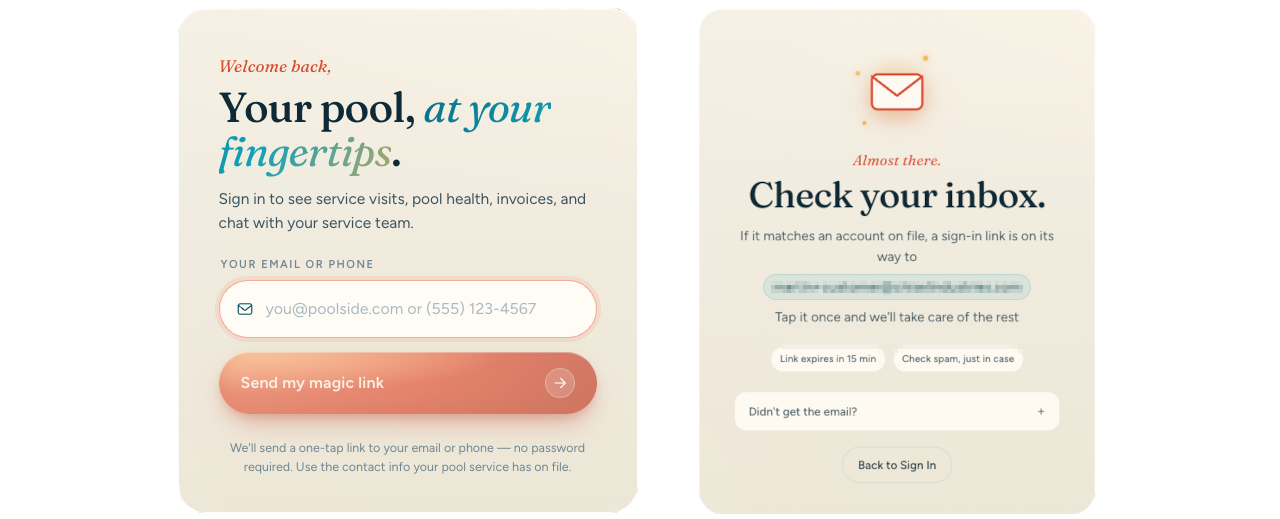
Sign in to your customer portal using a magic link sent to your email or phone number. No password is required.

  1. Go to https://app.chiseltide.com/portal.

  2. Enter the email address or phone number your pool service company has on file into the Your email or phone field.

  3. Click Send my magic link.

  4. While the link is being sent, the button changes to Sending your link.

  5. Check your inbox for the email version, or your text messages for the SMS version.

  6. When the confirmation screen appears, you will see either Check your inbox. or Check your messages. depending on how you received it.

  7. Open the one-tap link on the same device to enter the portal.

The portal does not use passwords. You will always sign in with a magic link sent to your email or phone.

If you are having trouble signing in

I don't know which email or phone number is on file

The portal only sends the magic link to the contact info your pool service company has recorded in your account. You can check any communications from your pool service company to see which email address or phone number they have. Or you can contact your pool service company directly and ask them to confirm the email address or phone number listed in your account. Once you have the correct info, return to the portal sign-in page and try again.

Error messages you may see

If something goes wrong after tapping a magic link, the portal shows one of these exact messages:

  • This link is invalid or has already been used. — The link was already clicked, broken, or copied incorrectly. Request a fresh link from the sign-in page.

  • This link has expired. Please request a new one. — Magic links have a limited lifespan. Enter your email or phone again and click Send my magic link for a new one.

  • Portal access has been disabled for your account. Contact your pool service provider. — Your pool service company has turned off portal access for your account. Reach out to them directly to re-enable it.

  • Something went wrong. Please try again. — A temporary server issue occurred. Wait a moment and request a new magic link.

If you ever need to start over on the sign-in page, click Back to Sign In to reset the form and try again.

Common questions

Do I need a password?

No. The portal uses magic links for sign-in. You will never create or need to remember a password.

Can I sign in if I opted out of SMS?

Yes. Opting out of SMS does not affect your ability to access the portal. You can still receive your magic link by email. But you will not be able to sign in using your phone number.

Can I use a different email or phone number?

The portal only recognizes the email address or phone number your pool service company has on file. If you need to use a different one, ask your pool service company to update your account.

Was this helpful?